

Improve every shift.
CCS Uptime connects machine conditions, maintenance work, and plant knowledge so every shift can see what changed, act with context, and carry the lesson forward.
30 minutes · your jobs and your machines · no slide deck
Coordinate the work. See the operating result.
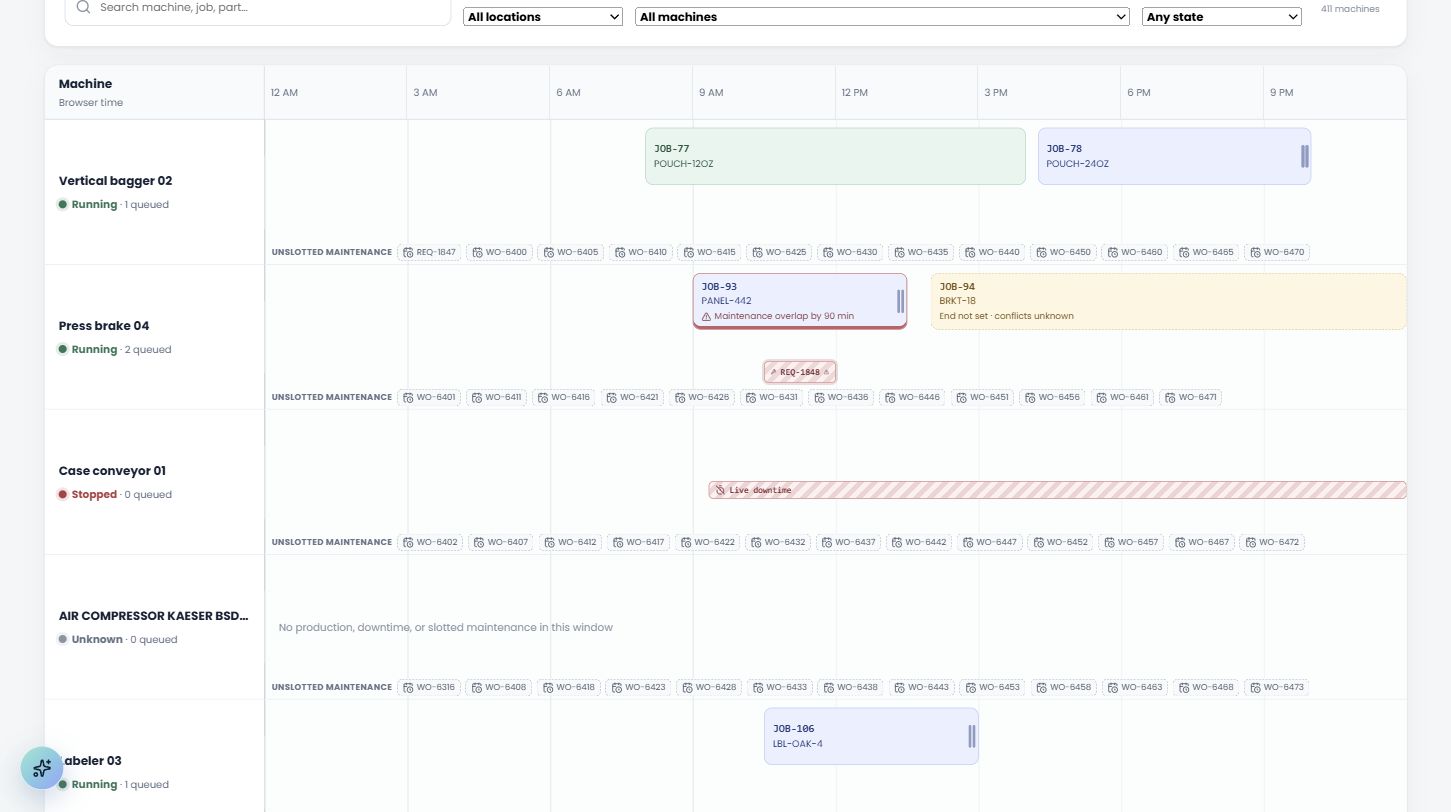
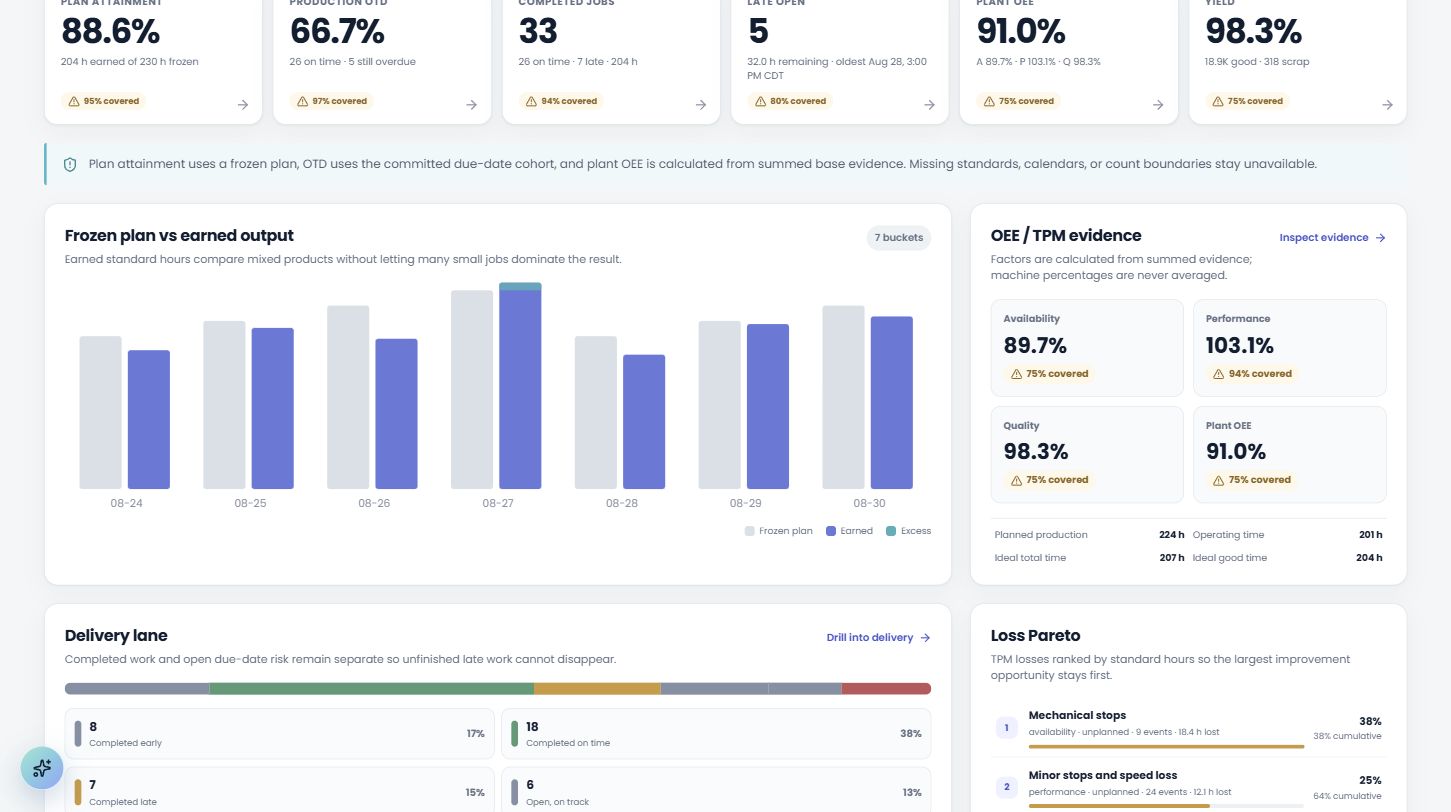
Production remains the authoritative schedule while maintenance reserves exact machine time against it. Both teams see the same jobs, maintenance windows, live downtime, open capacity, and conflicts. Then Plant Performance connects those decisions to delivery, OEE, yield, losses, flow, capacity, and risk without hiding incomplete evidence.
Coordinate production and maintenance on the same machine clock.
Build the authoritative production sequence, then reserve maintenance against the same machine clock. Jobs, exact maintenance windows, live downtime, unslotted work, and the current time share every lane. Both timelines use the same scheduling flow: drag to propose, inspect the conflict, and explicitly save the change.
- drag queued jobs between machines or along the timeline; use exact-time controls when precision matters
- see blocking maintenance, reduced-capacity work, live downtime, and open capacity against the jobs they affect
- send a durable move request to the other team without changing either schedule automatically
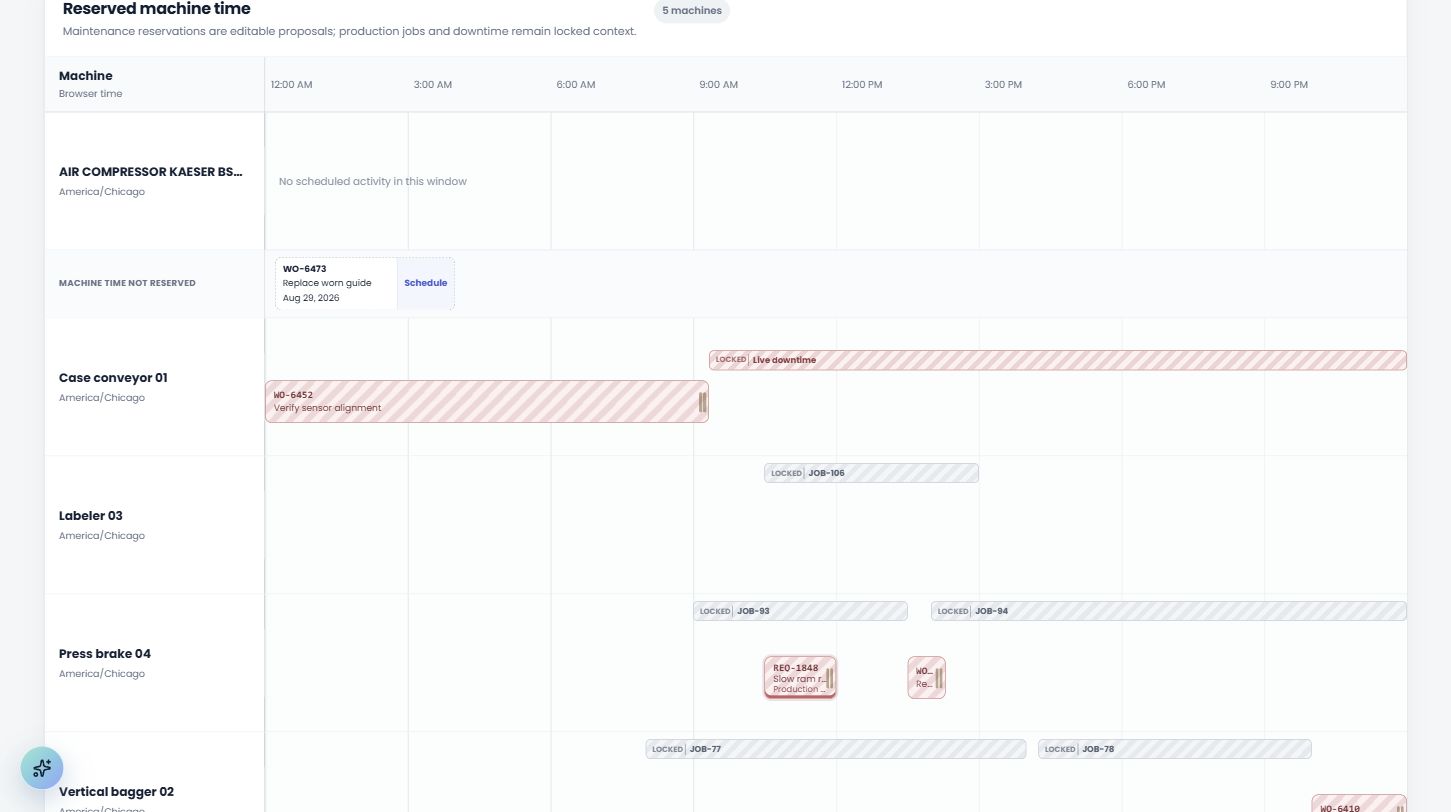
- see reserved machine time and production context from either planning workspace
“Does it automatically reschedule production or maintenance?”
No. Both teams see the same machine-time projection, the same conflict advisories and the same verified free gaps — and an authorized person decides whether either schedule changes.
Connect schedule decisions to delivery, flow, and capacity.
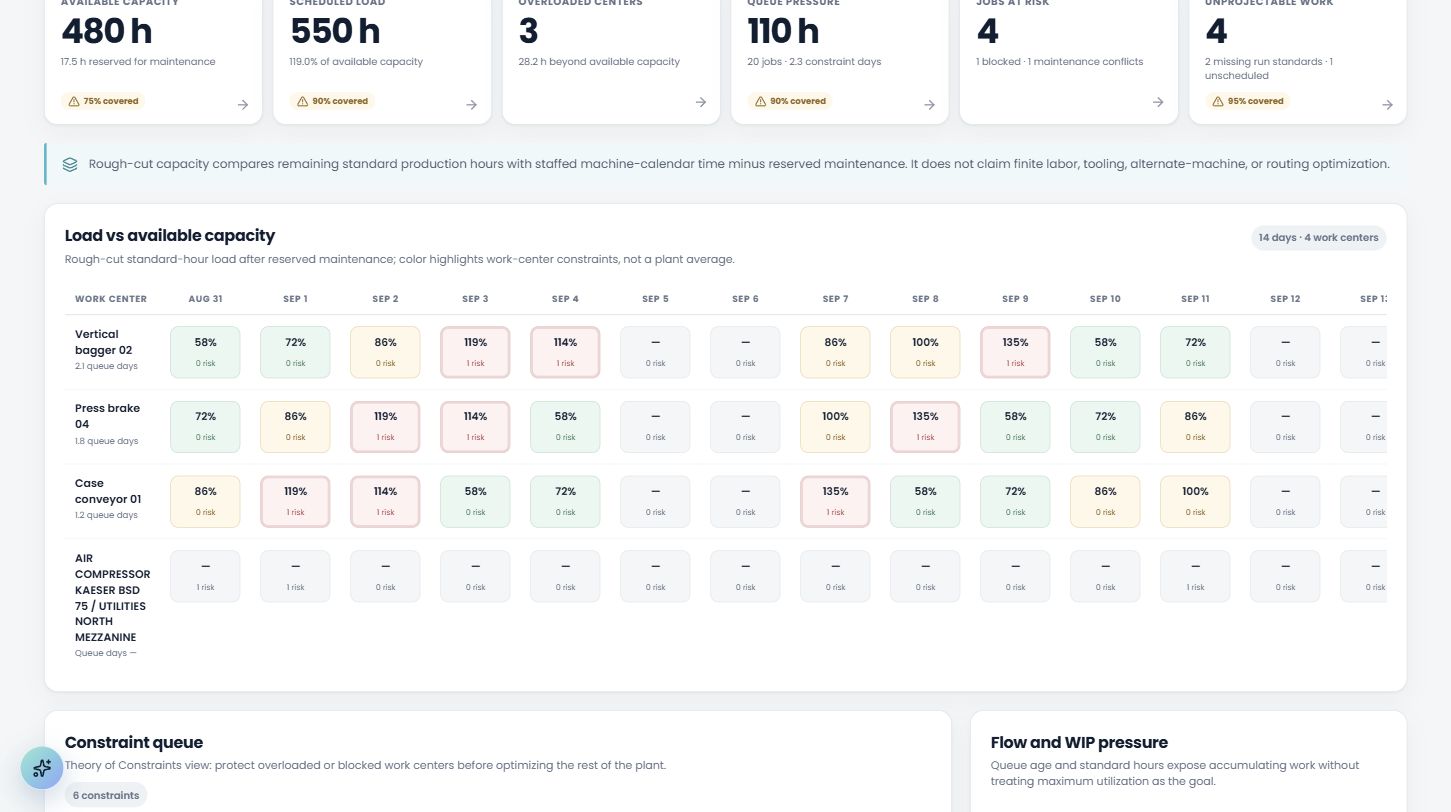
Plant Performance turns the shared schedule into a daily operating view. Frozen plan attainment, production on-time delivery, completed and late jobs, plant OEE, yield, losses, WIP, constraint pressure, and forward capacity stay connected to the work centers and evidence that produced them.
- compare frozen production hours with earned standard hours without averaging machine percentages
- separate completed delivery performance from still-open overdue and at-risk work
- see rough-cut load after reserved maintenance, overloaded centers, queue pressure, and unprojectable work
- keep missing calendars, standards, counts, and due dates visible instead of converting them to zero
Give the person at the machine the next useful action.
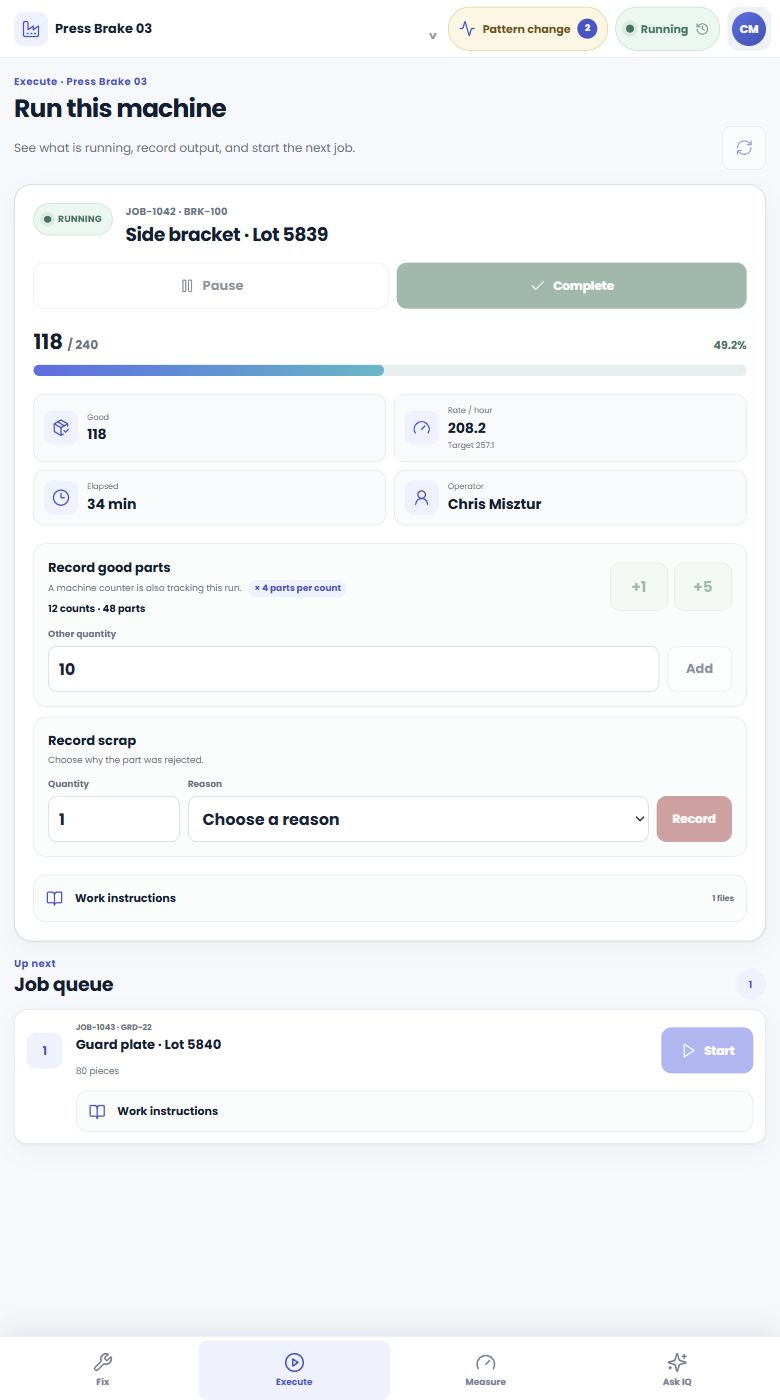
The phone and tablet experience stays focused on execution: see the running job, read instructions, record good and scrap output, explain downtime, complete a checklist, report a problem, or ask about the machine without leaving the floor.
- maintenance constraints appear before an operator starts work
- run-signal history and production counts support the human record
- free operator access keeps observations tied to the person and shift
Work the right problem with the evidence attached.
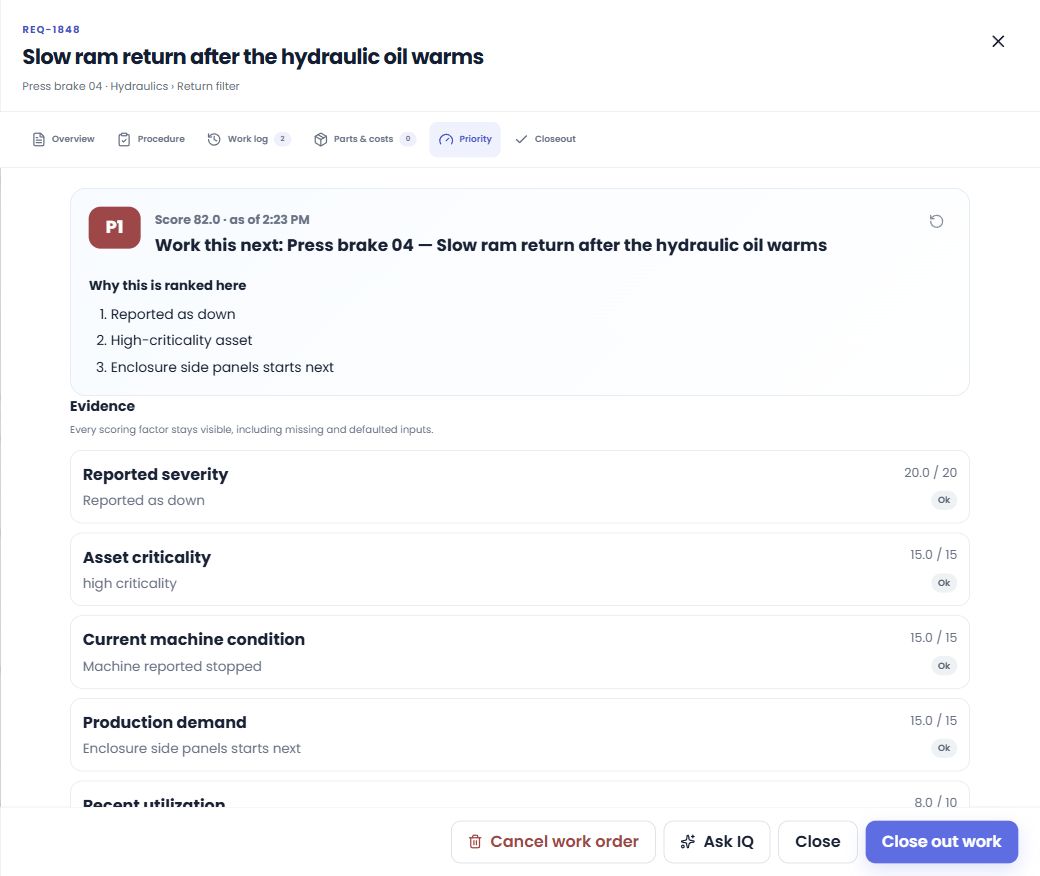
Requests become structured work with asset, component, condition, production demand, assignment, procedure, parts, labor, attachments, and close-out evidence. Priority recommendations explain every factor and keep missing evidence visible.
- Today, Kanban, calendar, PM plans, procedures, and mobile execution
- parts, costs, documents, meter conditions, notifications, and follow-up
- close-out codes and repair detail feed reliability and case memory
Ask what conflicts. Take the next authorized action.
CCS can ground an answer in live machine data, manuals, work history, parts, failure evidence, and the shared production-maintenance timeline. It can find verified free gaps, explain an overlap, and — when the user has permission — move a queued job, reserve machine time, or send the other team a schedule request. Role checks, visible tool results, and confirmation for destructive actions keep the user in control.
Can we take Press 2 down for the bearing job this week?
The longest verified gap fits the procedure with margin. I can reserve that machine time, or send production a move request instead — neither changes a schedule until someone saves it.
Turn repair history into fewer repeat failures.
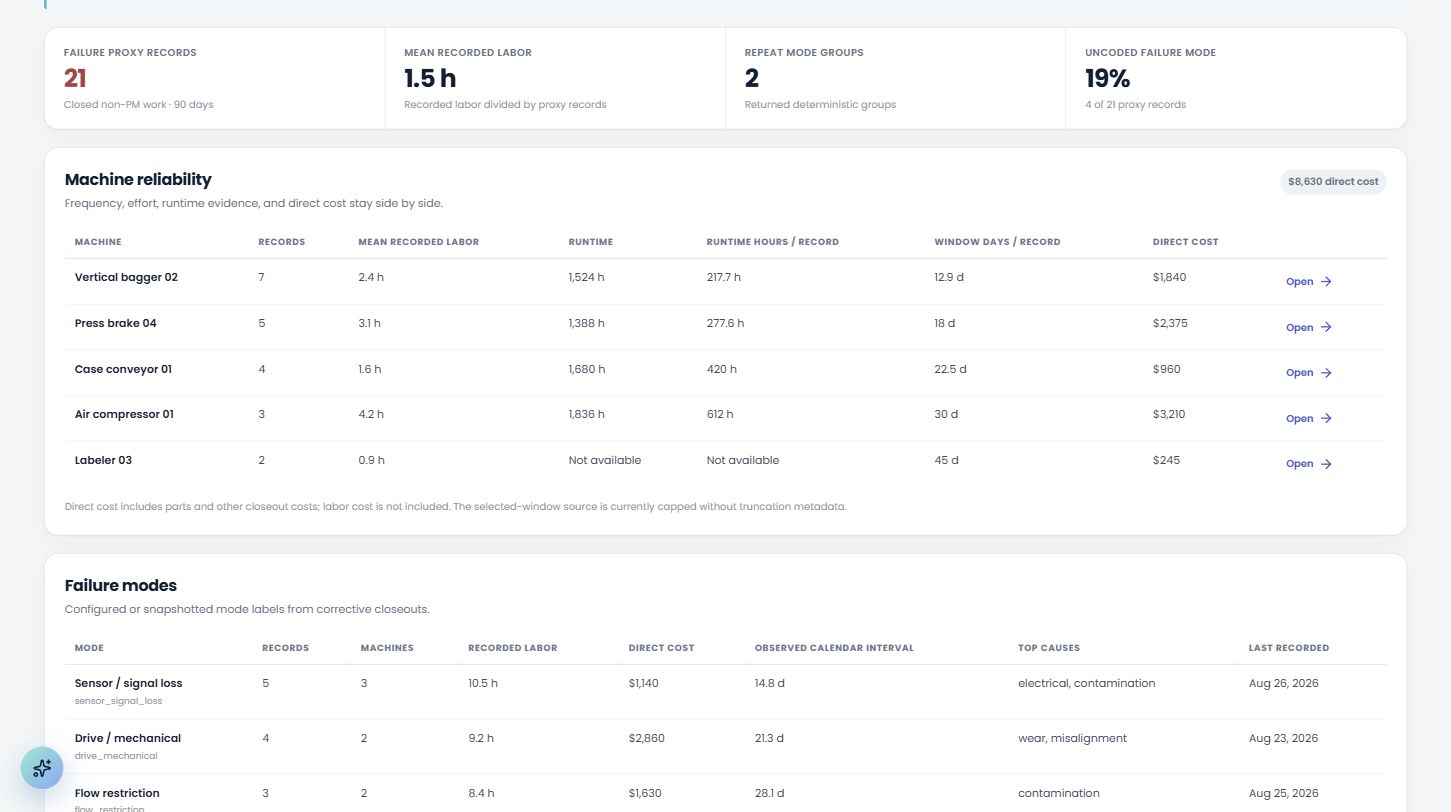
Downtime episodes, coded failures, component paths, labor, parts, direct cost, and available runtime evidence come together by machine. Repeat patterns become visible, close-outs become searchable cases, and observed recurrence can challenge the assumptions in the FMEA.
- downtime by reason and machine with episode-level coding
- failure modes, causes, assemblies, recurrence, and repair effort
- FMEA and case memory stay connected to what the plant observed
From one run signal to a connected plant.
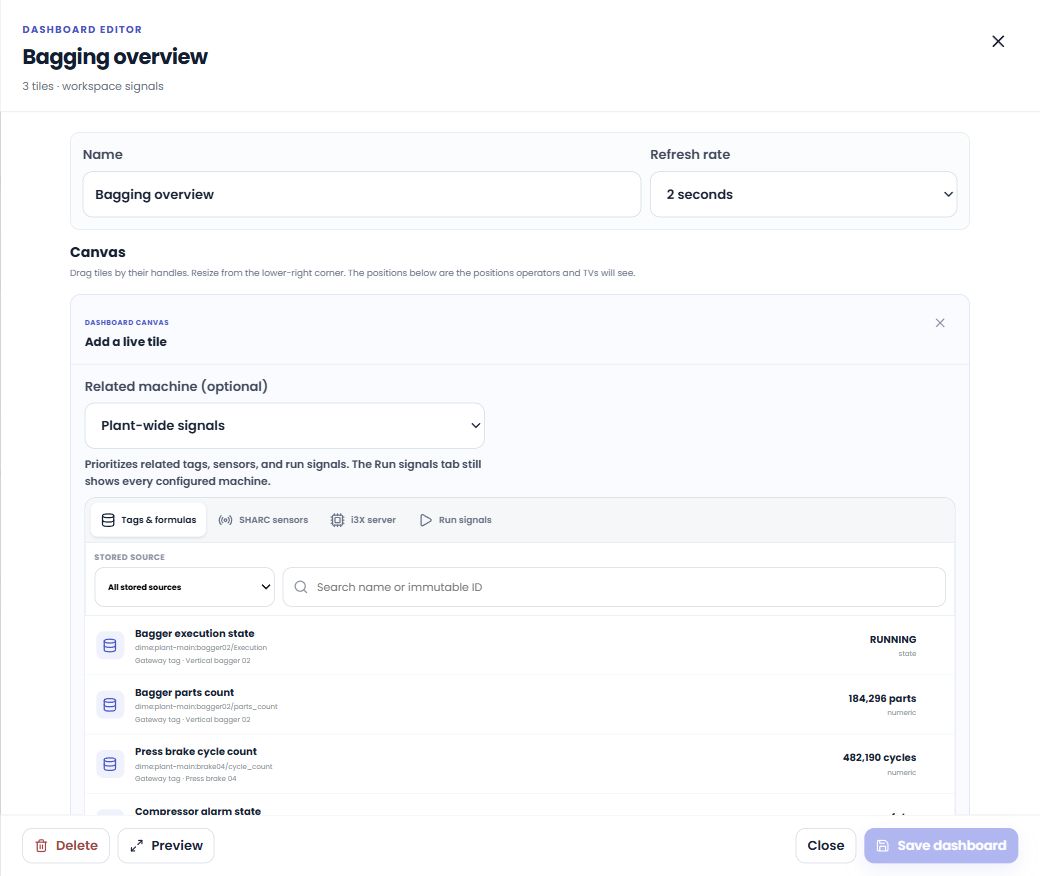
Start manually, bind one existing signal, or connect the broader machine-data stack. Stored tags, formulas, SHARC channels, i3X objects, run states, counters, and meters become reusable signals for dashboards, downtime, production counts, condition rules, and analysis.
Every source in one place, wherever the product needs one.
Stored tags and formulas, SHARC channels, i3X objects, and machine run signals all surface through the same browser — so a dashboard tile, a downtime rule and an analysis all draw from the same catalogue.
The same intelligence, where you need it. Run CCS Uptime as a cloud workspace or as a dedicated single-tenant installation on your server. Configure AI and document storage for the deployment, keep history backed up and exportable, and give each team the interface in the language it works in.
Bring one real week of your plant.
Thirty minutes. We load your machines, a week of production jobs and one of your manuals into a live workspace while you watch — so the question at the end is whether it fits your plant, not whether the demo looked good.
Book a live demoOr start on your own
Create a workspace free. Add a card when you're ready to start the 30-day full trial.
$90 / user / month (introductory price)
Questions owners actually ask
How much does it cost?
Maintenance seats are $90 each per month with a 3-seat minimum ($270/month). Operators are free and unlimited. Machine-data gateways are $90 per connected site per month. Purchasing, analytics, CCS, and preventive maintenance are included. You can create a limited workspace without a card; adding one starts the 30-day full trial.
Can CCS take action, or does it only answer questions?
It can do both. The maintenance assistant can analyze live records and cited documents, inspect production and maintenance timing, find verified free gaps, and then use role-checked tools to schedule authorized work, create or update work, build procedures and PM plans, configure dashboards, and add meter rules. Tool results remain visible, and destructive actions require confirmation.
Does the system automatically reschedule production or maintenance?
No. Production jobs and maintenance work remain separate records. Both teams see the same machine-time projection, conflict advisories, verified free gaps, and durable move requests, but an authorized person decides whether either schedule changes.
What happens to my data if I cancel?
It stays yours. Cancellation or a failed payment demotes the workspace gracefully — the founder keeps access, nothing is deleted, and you can export everything.
Do operators need accounts or their own hardware?
No. Operators share the machine tablets — tap your name, enter a 4-digit quick code. Quick codes only open the operator side, never the maintenance portal. And operators never consume paid seats.
Can we bring our existing maintenance history?
Yes. We can map machines, work-order history, PM schedules, parts, and people into CCS Uptime. Imported close-outs can become searchable case history, so the system begins with what your team has already learned instead of starting from zero.
Do you support i3X machine data?
Yes — natively. Point CCS Uptime at any i3X-speaking server and its live values and history become dashboard tiles and downtime run signals without a custom integration. For machines that don't speak anything yet, a wireless SHARC sensor covers them in about five minutes.
We already collect machine data. Can CCS Uptime use it?
Yes — that is the intended path. CCS Uptime accepts data from an on-site collector over MQTT, so whatever it already speaks (OPC-UA, Modbus, MTConnect, Fanuc, S7, EtherNet/IP…) reaches CCS Uptime without new PLC work. You provision a gateway per site, paste the generated config block, and its tags register themselves as they arrive. The collector timestamps readings at the source, while the gateway kit's local MQTT bridge queues across WAN outages and drains after reconnect. Raw retention is configurable and permanent hourly summaries keep long-range trends economical.
Does purchasing need our ERP, or does CCS Uptime handle it?
CCS Uptime handles the whole maintenance purchasing loop itself: requisition → RFQ → purchase order → receiving, with multi-vendor multi-brand pricing under one internal stock number and full price history. Shops without an ERP run purchasing entirely in CCS Uptime; shops with one keep financials there and use CCS Uptime for the maintenance-side flow.
How fast can it answer from OUR manuals?
Upload the PDF and CCS Uptime indexes its text, tables, and page images. Typical manuals become answerable with page-level citations in about a minute; large or complex documents can take longer.
Where does our data live, and what is backed up?
Cloud workspaces isolate each tenant's operational database, document prefix, search collections, and device ownership. Nightly backups cover operational records, search data, ingestion records, and broker access state. Dedicated deployments use the same application with storage and AI providers configured for the installation. Ask us to walk through the exact data path before rollout.